
Business Process Automation: Stop Copying Data Between Your Own Tools
If someone on your team spends part of their week downloading a CSV from one system and uploading it into another, that's not a staffing problem - it's a missing connection between two pieces of software. I build the custom integrations and workflow logic that close that gap, so the data moves on its own.
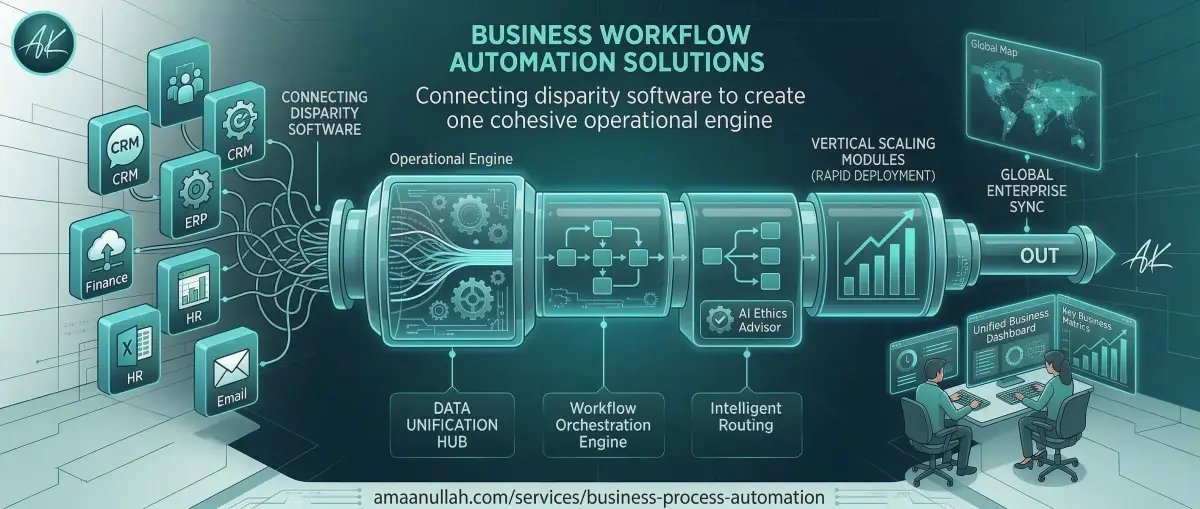
What business process automation actually means here
Business process automation, as I build it, means writing custom middleware and integration logic that connects the software you already use - your CRM, accounting tool, HR system, or e-commerce platform - so that data and actions move between them automatically, without someone manually re-entering it.
This is different from buying a no-code automation tool (Zapier, Make, n8n) off the shelf. Those work well for simple, standard connections between popular apps. Custom automation is the right call when your workflow has business-specific rules a generic connector can't express, or when one of your systems doesn't have the integration those tools support out of the box.
A concrete example: when a deal closes in your CRM, a custom automation can - in the same few seconds - notify the right person on Slack, generate and email the invoice, create the customer's account in your delivery system, and log the transaction in your accounting software. No one on your team touches any of those four steps.
Off-the-shelf tool or custom build? An honest answer.
Most businesses don't need a fully custom automation system - and I'll tell you that in the first conversation if it's true for you. Here's the actual decision:
| Your situation | Better fit |
|---|---|
| Connecting two popular, well-known apps (e.g. Shopify -> Mailchimp) | A no-code tool (Zapier, Make, n8n) - cheaper and faster |
| Your workflow has conditional business logic (e.g. "route this lead differently based on deal size, region, and current reps load") | Custom automation |
| One of your systems is old, internal, or has no public API | Custom automation - this is usually where off-the-shelf tools hit a wall |
| You're automating something high-volume where a subscription-per-task pricing model gets expensive fast | Custom automation - you own it outright, no per-task fees |
I build custom because that's where a developer adds more value than a subscription tool can - not because it's always the answer. If a $20/month Zapier plan solves your actual problem, I'll say so.
What I build
Custom API Middleware
Software that sits between your existing tools and translates data from one system's format into another's, in real time. This is the core of most automation projects - most business software has an API, it's just never been asked to talk to your other software.
Workflow & Approval Logic
Beyond just moving data - automating the decisions around it. Assignment rules, approval chains, conditional routing (if X, notify Y; if Z, escalate). This is what turns "the data arrived" into "the right thing happened because the data arrived."
Legacy System Integration
If one of your tools is old enough that it doesn't have a modern REST API - a desktop accounting package, an internal database, a system your industry still runs on - that's usually where automation projects actually get stuck. I build around this rather than telling you to replace the system.
Document & Data Processing
Automatically pulling structured data out of invoices, forms, or reports so it doesn't get typed in by hand. Useful for accounting ingestion, HR onboarding paperwork, and vendor documentation.
Real example: the HRM payroll portal I built automates attendance tracking, leave approval, and payroll calculation in one system - the kind of month-end process that used to eat a full day of HR's time every cycle. If you specifically need AI to read and classify unstructured documents (emails, PDFs, handwritten forms) as part of this, that's covered under AI Automation Services - this page covers the integration and workflow layer; that one covers automation that requires judgment calls, not just data movement.
How this pays for itself
Independent research gives a useful baseline for what this kind of automation is worth: McKinsey research on business process automation found companies typically cut operational costs by 20-30% and improve process efficiency by over 40% in the areas they automate. That's an industry figure, not a guarantee specific to your business - but it's the right order of magnitude to weigh against a project's cost.
The more useful question for your specific case: how many hours a week does someone spend moving data by hand, and what's that person's time worth doing something else? That's the number I ask for in the first conversation, because it's what tells us whether a project pays for itself in 3 months or 18.
How a project runs
1. Process audit
I map your current workflow - which tools you use, where data currently gets copied by hand, and where errors actually happen. This is free, and sometimes the answer is "you don't need a custom build."
2. Integration plan
I identify what each system's API can and can't do, and design the middleware and logic before writing code - so you know what you're getting before you're paying for it.
3. Build in stages
Automations get built and tested one connection at a time, not delivered as one untested system at the end.
4. Staging test with real data
Every automation runs against a copy of your real data before it touches production - a mistake in an automated invoice or payroll run is expensive, so this step isn't optional.
5. Launch with monitoring
You get alerts if an automation fails silently - the worst version of "automated" is a broken process nobody notices for two weeks.
Frequently Asked Questions
What kinds of processes can actually be automated?
Can you connect tools that don't have a public integration with each other?
What if our software is old and doesn't have an API at all?
Is automation risky? What happens if a process breaks?
How is this different from your AI Automation service?
How much does a custom automation project cost?
Scale your operations without scaling headcount
Tell me which two (or three, or five) systems your team is manually bridging right now. I'll audit the actual workflow - free, no obligation - and tell you honestly whether you need custom automation or a $20/month tool.
Centralize your automated data.
Explore Custom CRM Development to manage your automated lead flow